
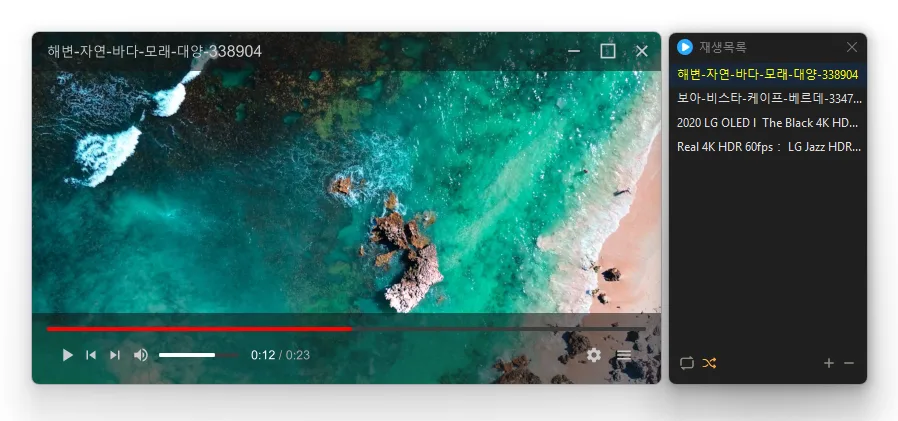
Update
- Fixed update and confirmation dialogs appearing behind always on top windows
- Changed the window title to show the folder, file name, and playlist position
- Added separate options to disable automatic hiding of the caption and control bar
- Added caption and control bar display when seeking with the keyboard
- Added playback controls with Windows media keys while the window is inactive
- Changed Stop to pause playback and return to the beginning
- Added repeat playback between selected start and end points
- Changed the default playback speed shortcuts to C X Z
- Added experimental reverse playback to the context menu
- Plays many media formats right away, with no extra codecs to install.
- Hardware acceleration keeps high-resolution video smooth.
- Ready to use as soon as it is installed, and it stays light and fast.
Website
- KPlayer: https://kplayer.kilho.net
History
-
Version 1.3.0 (2026/10/26)
- Added aspect ratio preservation when resizing from a window edge
- Changed shortcut settings to assign keys for each action
- Refined recovery after graphics errors in some environments
- Added selection of multiple playlist items by dragging across empty space
- Centered value labels on settings sliders
- Added shortcuts for changing the display size
- Added a shortcut for rotating the display
- Changed subtitle color selection to use a clickable color box
- Added playlist search
- Fixed the edge scrolling direction when moving playlist items
- Fixed seeking and volume adjustment failures in some locales
-
Version 1.2.2 (2026/10/20)
- Fixed the window growing on each launch after being moved between monitors with different scaling
- Added settings to assign actions to the mouse back and forward buttons
- Changed the screenshot folder field to expand with the path and browse button when selected
-
Version 1.2.0 (2026/10/19)
- Fixed the Always on Top state changing after switching apps or closing Settings
- Fixed video duration appearing one second longer than the actual length
- Fixed playback crashes in some environments
- Fixed an error when closing the program after playback
- Prevented crashes when adding deeply nested folders to the list
-
Version 1.1.7 (2026/10/16)
- Fixed previous videos retaining memory after switching to the next video on some systems
- Reduced memory usage when previewing 4K AV1 videos on some systems
- Added a spinning LP with a circular title display when playing music without cover art
- Fixed a brief white window appearing immediately after launch on some Windows 11 systems
- Changed opening an associated file to replace the existing playlist with the opened files
- Added playback progress to the taskbar button
- Added file name search to the playlist window
License
- KPlayer is open-source software.
- Use it freely anywhere, whether at home, at work, in a government office, or at school.
- You’re free to distribute it anywhere.
Download
 Download
(Windows)
(GitHub)
Frequently Asked Questions (FAQ)
- Is KPlayer free?
Yes, KPlayer is free to use anywhere, including at home, at work, in government offices, and at school. - Which video formats does it support?
It supports major media formats such as MP4, MKV, AVI, MOV, WMV, ASF, and MP3. - Does it include ads or adware?
No, KPlayer is completely free of ads and adware. No unwanted programs are installed along with it. - Is it open source?
Yes, KPlayer is distributed as open-source software. You can inspect the source code, and the project is developed transparently. - Can I add multiple files at once?
Yes, you can add multiple files or folders to the playlist at once by dragging and dropping them.
Related Links
- Program source code: https://github.com/newkilho/KPlayer
- Update announcement: https://kilho.net/archives/notice/2940