
Update
- Fixed an issue where the window could remain enlarged after a screen resolution or scaling change on some systems
- Fixed an issue where the update prompt could appear behind the program window on some systems
- Added an option to create a desktop shortcut during installation
- Simplified installation by removing the information page
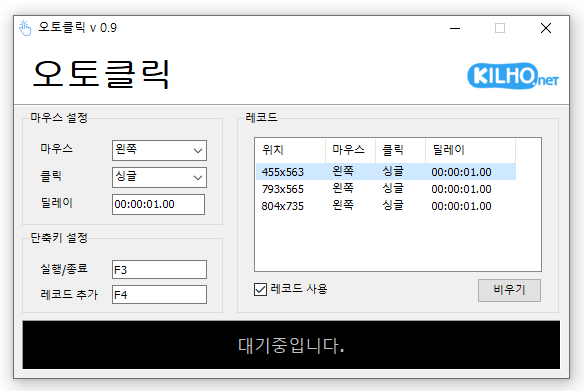
- A mouse automatic click program.
- You can add time and coordinates to use in multiple patterns.
- Click details can be specified.
Website
- AutoClick: https://autoclick.kilho.net
History
-
Version 2.0.2 (2026/10/31)
- Changed installation and removal to close the running app after saving
- Refined the appearance and highlighting of expanded selection lists
-
Version 2.0.1 (2026/10/03)
- Fixed crashes after list saving failed during automatic clicking on affected systems
-
Version 2.0.0 (2026/10/02)
- Refactored the code for cross-platform support
- Added start / stop / completion notifications, stop shortcut guidance, and notification settings
- Improved relaunch behavior to bring the existing window to the front
- Prevented duplicate shortcuts with clearer messages
- Fixed auto-filled maximum intervals persisting after interval changes
- Improved readability of record intervals, running status, and dialogs
- Fixed menu mistranslations in some languages
-
Version 1.5.5 (2026/09/16)
- Fixed shorter wait times affecting some older saved records
- Fixed custom click interval ranges being reset when changing settings
- Added a notification when another program is using the same hotkey
- Improved responsiveness by reducing unnecessary delays after double clicks
- Prevented continuous clicking caused by an invalid repeat count
License
- AutoClick is freeware.
- You can use it freely anywhere, including at work, at home, in government offices, and at school.
- You can freely distribute it anywhere.
Download
 Download
(Windows)
 Download
(macOS)
Frequently Asked Questions (FAQ)
- Is this automatic mouse-clicking program free?
Yes, you can use this program for free in any environment, including at work, at home, at school, and in government offices. - Do I need to install the program?
No, it’s provided as a portable program that you can use right away without installing it. - Can it click multiple locations in sequence?
Yes, you can set multiple coordinates and have the program click them in sequence. - Can I set a specific interval between clicks?
Yes, you can specify the time interval between clicks in detail.
Related Links
- Update notice: https://kilho.net/archives/notice/2940