
Update
- Fixed a brief flash of the default title bar when closing the list and settings windows
- Preserved existing notes and login information after upgrading
- Added Ctrl+F search and a result count for note text
- Fixed the settings window closing when canceling shortcut entry with Esc
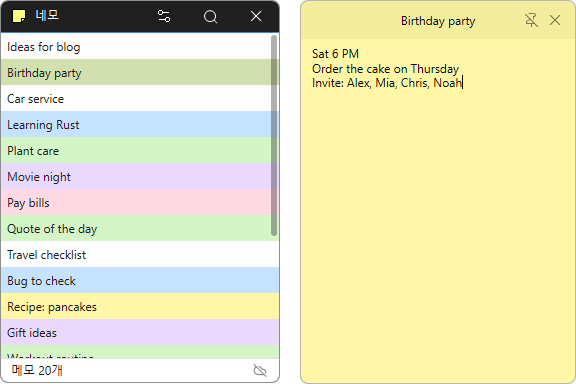
- Open a note like a sticky note and jot down thoughts as they come to you.
- A note’s position, size, and pin setting stay the same the next time you launch the app.
- Choose from a range of colors to tell your notes apart at a glance.
- Search note titles and contents to find what you need.
- Connect to the server whenever you need to manage the same notes on your PC and the web.
- Sign in securely through your browser using OAuth 2.0 and PKCE.
- Add emoji to give your notes a little more personality.
Website
- Nemo: https://nemo.kilho.net
History
-
Version 1.0.2 (2026/11/13)
- Fixed other notes being hidden behind other program windows when closing the list window or a note
- Added window snapping to notes, the list window, and screen edges when moving or resizing
- Added opening the list window by double-clicking the tray icon
- Adjusted window sizes after display scaling or resolution changes
-
Version 1.0.1 (2026/11/03)
- Opened the list when clicking the tray icon with no notes open
- Added four spaces when pressing Tab in note text
- Changed list and note scrollbars to appear only on hover or while scrolling
- Changed list order by dragging items, synced the order across PCs, and placed new notes at the top
- Disabled the run at startup setting in portable builds
- Increased line spacing in note text
-
Version 1.0.0 (2026/10/31)
- Added server sync 2 seconds after saving, every 10 minutes, or on demand
- Added sync that preserves notes edited on multiple devices as conflict copies
- Added note search by title and body in the list window
- Added note count and server connection and sync status to the list window
- Added a global shortcut for opening a new note and the option to change it
- Changed tray icon clicks to bring open note windows to the front
- Added emoji support
-
Version 0.9.9 (2026/08/16)
- Rewrote the entire program code for faster and more reliable performance
License
- Nemo is freeware.
- You can use it freely anywhere, including at work, at home, in government offices, and at school.
- You’re free to distribute it anywhere.
Download
 Download
(Windows)
Frequently Asked Questions (FAQ)
- Where are my notes saved?
They’re automatically saved to the server. - Can I use it on another PC?
Yes, just log in to access the same notes. - Can I use it on the web, too?
Yes, you can manage the same notes on your PC and on the web. - Are the position and size of my notes saved?
Yes, their position, size, and pinned status are automatically restored. - Do I need to install the program?
No, Nemo is a single file that you can use right away without installing anything.
Related Links
- Update announcement: https://kilho.net/archives/notice/2940