
Update
- Improved launch compatibility with Windows 7, 8, and 8.1
- Refined window sizing after display or scaling changes, and remembered user adjusted window sizes
- Fixed update notices being hidden behind minimized or hidden windows
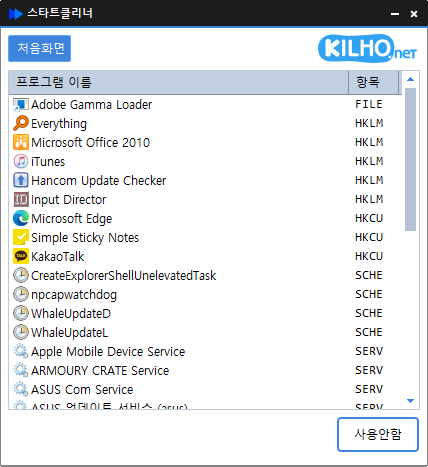
- Easily manage programs that run automatically at boot time.
- Unified management of startup folders, registry, task scheduler, services, and more.
- Safely change settings by disabling instead of deleting.
Homepage
- StartCleaner: https://startcleaner.kilho.net
History
-
Version 2.0.3 (2026/10/26)
- Fixed unexpected exits while loading the startup list in some environments
- Fixed list rows appearing partially clipped while scrolling
- Added a restart after graphics errors in some environments
-
Version 2.0.2 (2026/10/03)
- Reduced unexpected program exits on affected systems
-
Version 2.0.1 (2026/10/01)
- Improved performance and reliability with a new Rust port
- Improved managing startup programs and services quickly in one place
- Refined lists and workflows for easier access to key features
-
Version 1.1.2 (2026/09/22)
- Added a safety check to help prevent accidental deletion of startup items
- Fixed an error when loading update information on some devices
License
- StartCleaner is freeware.
- Use it freely anywhere, including at work, at home, in government offices, and at school.
- You may distribute it freely anywhere.
Download
 Download
(Windows)
Frequently Asked Questions (FAQ)
- Is StartCleaner free?
Yes, you can use StartCleaner for free at work, at home, at school, and in government offices. - Does it need to be installed?
No, just run it and start using it—there’s no installation process. - Can I only disable items, rather than delete them?
Yes, you can safely manage settings by disabling items instead of deleting them. - What can I manage?
You can manage all items that run automatically at startup, including the Startup folder, registry entries, Task Scheduler tasks, and services.
Related Links
- Update announcement: https://kilho.net/archives/notice/2940