Update ·

1stChip 0.9.2 Update

Update

  • Expanded the name area for devices without a status indicator and added ellipses for long names and versions
  • Changed the scroll bar to appear only when hovering over the device list
  • Changed status hints to appear inside the program window
  • Removed arrow key navigation in the device list
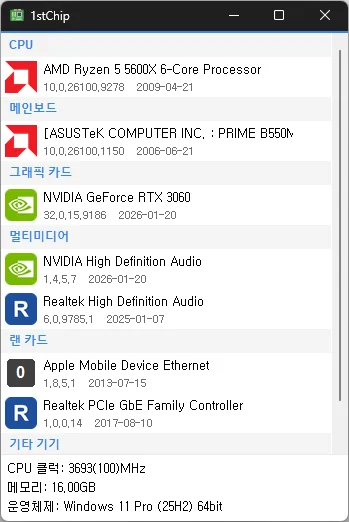
  • See your CPU, motherboard, graphics card, multimedia, network card and other devices on one screen.
  • Shows the installed driver version and date for each device.
  • Compares against the server and tells you when a newer driver is available.
  • Shows CPU clock, memory size and operating system.
  • No installer: unzip and run, so you can carry it on a USB drive.

Website

History

  • Version 0.9.1 (2026/09/24)
    • Fixed untranslated CPU clock, memory, and operating system information
    • Fixed an issue where invalid date information could close the app
    • Improved stability when loading PC information on some systems
    • Fixed missing guidance for devices experiencing problems
  • Version 0.9.0 (2026/09/18)
    • First Release

License

  • 1stChip is freeware.
  • Use it freely at work, at home, in government offices, at school, or anywhere else.
  • You’re free to distribute it anywhere.

Download

Frequently Asked Questions (FAQ)

  • Does it install drivers automatically?
    No. It tells you whether your drivers are up to date and directs you to the download page.
    You’ll need to install the drivers yourself using the manufacturer’s files.
  • Can I use it without an internet connection?
    Yes. You can check your system specs and installed drivers offline. An internet connection is only needed to check for newer drivers.
  • Does it show ads?
    No, there are no ads.
  • Can I use it without installing it?
    Yes. It’s portable, so just unzip it and run it.
  • Is it paid software?
    No, it’s free (freeware).

Related Links

Leave a Reply

Your email address will not be published. Required fields are marked *