
Update
- Fixed missing tray icons when the taskbar appeared late on some systems
- Prevented Enter input and list responses from stalling during searches with many results
- Changed hidden-window disk information updates to occur when the window is shown again
- Updated window sizing after display scaling or resolution changes and when moving to a monitor with different scaling
- Fixed update prompts not appearing while the app was hidden in the tray
- Kept the caret visible only in the focused field and blinking during rapid typing
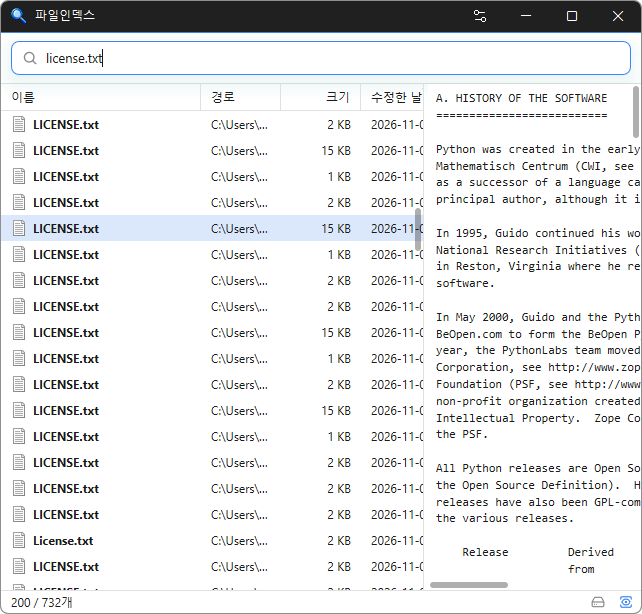
- Instantly find files across your entire PC by simply typing a file name.
- Supports Korean initial consonant search to find files with just a few keystrokes.
- Offers advanced search filters, including extensions, file sizes, wildcards, and regular expressions.
- Detects duplicate files by comparing names, sizes, and file contents.
- Keeps search results up to date by tracking file changes in real time.
- Minimizes system impact with fast initial indexing and low memory usage.
- Supports opening, copying, dragging and dropping, and previewing files just like File Explorer.
- Keeps your file index stored locally without sending data to external servers.
- Supports 22 languages and light and dark themes.
Website
- FileIndex: https://fileindex.kilho.net
History
-
Version 0.9.7 (2026/11/10)
- Reduced freezing when interacting with lists or opening files, folders, and web addresses.
- Fixed freezing during real-time updates when reopening windows.
- Updated document preview tables to wrap long text without spaces within cells.
- Changed document previews to update only after arrow-key file navigation stops.
- Fixed an issue where arrow-key input would stop working when selecting preview items in certain environments.
- Fixed black areas remaining after resizing a window during document preview.
-
Version 0.9.4 (2026/11/06)
- Added retries for up to one minute when the notification area icon fails to appear
- Added a loading indicator when search results take over 0.3 seconds to appear
-
Version 0.9.3 (2026/11/05)
- Added content search for text and document files with `:keyword`
- Added drag selection of multiple files from the path, size, or date columns or empty list space
- Changed startup indexing and change tracking to begin when the PC is idle
- Fixed the tray icon not appearing after startup in some environments
- Added the program version to the tray icon tooltip
-
Version 0.9.2 (2026/10/23)
- Fixed preview tasks that could stall or remain open on some systems
- Changed the right-click menu to the app menu and added a setting to use the Explorer menu
- Added direct file renaming in the results list
- Excluded Recycle Bin items from search results
- Added a global shortcut to open the window and F2 to rename files
- Added document previews for HWP, HWPX, DOC, DOCX, XLS, XLSX, PPT, and PPTX files
License
- FileIndex is open-source software.
- You can use it freely anywhere, whether at home, at work, in government offices, or at school.
- You’re free to distribute it anywhere.
Download
 Download
(Windows)
Frequently Asked Questions (FAQ)
- Is FileIndex free?
Yes, KPlayer is free to use anywhere, including at home, at work, in government offices, and at school. - Does it use a lot of memory if I leave it running?
No. When you close the window, it hides in the system tray and releases the memory used for searching after a short while. While it’s out of sight, it runs using very little memory. - Does it include ads or adware?
No, FileIndex is completely free of ads and adware. No unwanted programs are installed along with it. - Are my file lists sent anywhere?
No, your file lists are stored only on your PC.
Related Links
- Update notice: https://kilho.net/archives/notice/2940