
Update
- Added Gemini usage from Antigravity sign-in to the taskbar gauge and detail window
- Changed the detail chart to daily weekly usage bars for the last 7 days and added date details on hover
- Remembered the detail window position and centered it when the saved position was off-screen
- Extended usage history retention to 31 days and preserved existing records
- Showed 0% instead of a dash immediately after a 5-hour reset when usage is empty
- Applied graduated colors to usage bars in the detail window
- Changed installation and removal to wait for the running app to close before proceeding
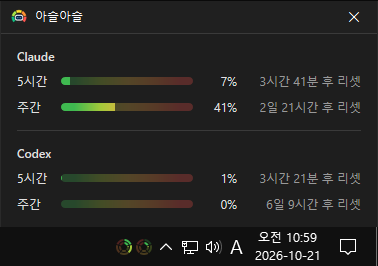
- Display 5-hour and weekly usage as a circular dual-ring gauge.
- Periodically check Claude and Codex usage rates to keep the data up to date.
- Hover over the gauge to view the 5-hour and weekly usage rates for each service.
- Click the gauge to view usage rates, time remaining until the next reset, and usage history.
- Automatically adapt the gauge's appearance to match the Windows taskbar's light or dark theme.
- Display a chart showing weekly usage trends over the past 7 days.
Website
- KPlayer: https://aseul.kilho.net/
History
-
Version 0.9.0 (2026/10/21)
- First Release
License
- KPlayer is open-source software.
- Use it freely at work, at home, in government offices, at school, or anywhere else.
- Feel free to distribute it anywhere.
Download
 Download
(Windows)
Frequently Asked Questions (FAQ)
- Is it free?
Yes. Aseul is freeware, so you can use it for free at work, at home, or at school. - Does it show ads?
No. You can use it without ads. - Can I use it without installing it?
Yes. Download the portable version, extract it, and run Aseul.exe. - Do I need to log in separately?
No. If you’re logged in to Claude Code or Codex, Aseul reads your usage from that account. Codex usage appears when you’re logged in with a ChatGPT account. - Can I use just Claude or just Codex?
Yes. Only the services you’re logged in to will appear on the gauge and status window. - Does it start automatically when I turn on my computer?
Yes. Turn it on or off using Run at startup in the gauge’s right-click menu. The installer version enables this during installation.
Related Links
- Update announcement: https://kilho.net/archives/notice/2940