

KPlayer
A clean and free video player without ads.
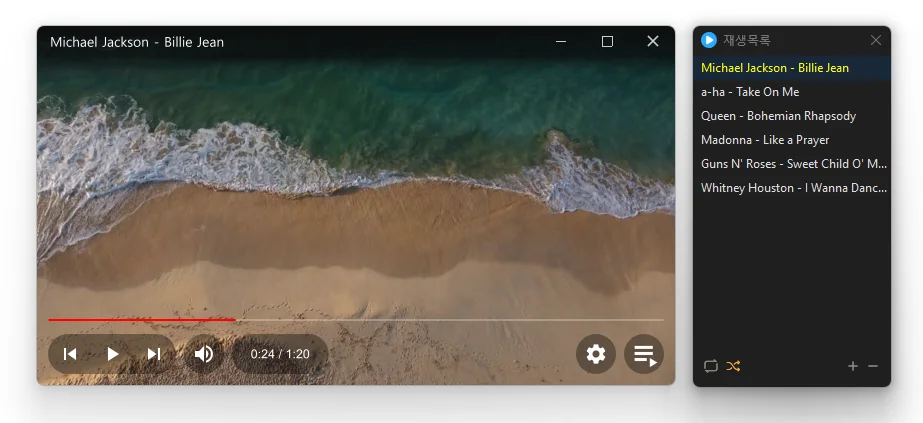
Feature
- Plays many media formats right away, with no extra codecs to install.
- Hardware acceleration keeps high-resolution video smooth.
- Ready to use as soon as it is installed, and it stays light and fast.
Usage
- Drag a file in, or add it to the playlist.
- Click the play button.
Homepage
License
- KPlayer is Freeware.
- Use it anywhere you like — at the office, at home, in government offices, or at school.
- You may redistribute it freely anywhere.
History
-
Version 1.3.0 (2026/10/26)
- Added aspect ratio preservation when resizing from a window edge
- Changed shortcut settings to assign keys for each action
- Refined recovery after graphics errors in some environments
- Added selection of multiple playlist items by dragging across empty space
- Centered value labels on settings sliders
- Added shortcuts for changing the display size
- Added a shortcut for rotating the display
- Changed subtitle color selection to use a clickable color box
- Added playlist search
- Fixed the edge scrolling direction when moving playlist items
- Fixed seeking and volume adjustment failures in some locales
-
Version 1.2.2 (2026/10/20)
- Fixed the window growing on each launch after being moved between monitors with different scaling
- Added settings to assign actions to the mouse back and forward buttons
- Changed the screenshot folder field to expand with the path and browse button when selected
-
Version 1.2.0 (2026/10/19)
- Fixed the Always on Top state changing after switching apps or closing Settings
- Fixed video duration appearing one second longer than the actual length
- Fixed playback crashes in some environments
- Fixed an error when closing the program after playback
- Prevented crashes when adding deeply nested folders to the list
-
Update Policy Notice
- Auto-update is not supported to enhance security and prevent antivirus false positives.
- Updates are manually distributed after internal verification and stability confirmation.
 Download
(Windows)
(GitHub)