

ImageConverter
Change image formats in one click.
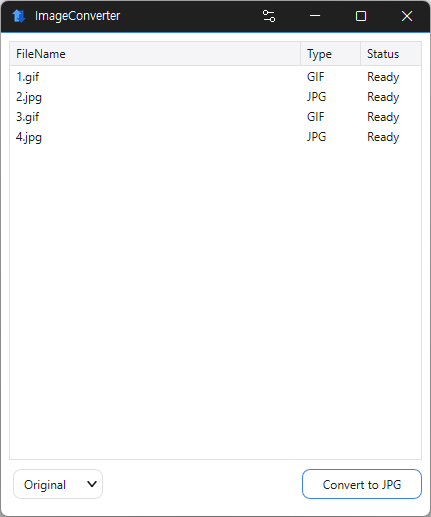
Feature
- You can change various image formats.
- Save JPG with higher compression using MozJPEG.
- Specify the width and the image will be resized accordingly.
- Supports PDF, SVG, AI, PSD, PNG, JPG, GIF, WEBP, and TGA.
- Images with file signature information are recognized even if they don't have an extension.
Usage
- Drag the image files you want to change into the list.
- Click the Convert button below.
Homepage
License
- ImageConverter is Freeware.
- Use it anywhere you like — at the office, at home, in government offices, or at school.
- You may redistribute it freely anywhere.
History
-
Version 2.1.0 (2026/10/24)
- Added drag and drop conversion from Explorer to JPG, PNG, GIF, WEBP, and TIFF
- Added the Explorer context menu to both the Windows 11 menu and the classic menu
- Reduced interruptions to the full conversion job when individual files fail
- Fixed GIF and WEBP conversion errors for filenames containing %
-
Version 2.0.0 (2026/09/22)
- Redesigned ImageConverter with a more convenient way to start converting
- Improved image size selection for easier use
- Improved the update experience so you can keep using your existing settings
- Improved right-click conversion in Windows
- Prepared support for more operating systems
-
Version 1.6.3 (2026/09/03)
- Improved Windows 11 right click access for faster image conversion
- Fixed an issue where the right click menu could be missing or duplicated on some PCs
- Improved updates that could pause Explorer or fail to complete in certain environments
- Enhanced PDF clarity and stability when converting large documents
- Improved HEIC and AVIF file recognition
- Prevented unnecessary conversion failures by detecting empty or invalid files earlier
- Updated program information to accurately reflect supported formats
-
Update Policy Notice
- Auto-update is not supported to enhance security and prevent antivirus false positives.
- Updates are manually distributed after internal verification and stability confirmation.
 Download
(Windows)