

AutoClick
Automatically click the mouse.
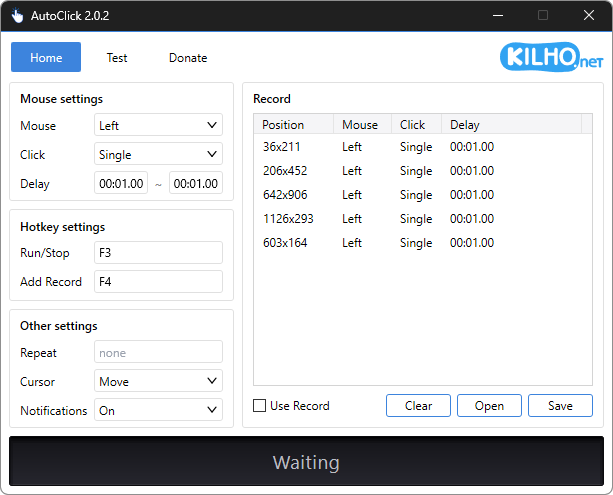
Feature
- A mouse automatic click program.
- You can add time and coordinates to use in multiple patterns.
- Click details can be specified.
Usage
- Select the repetitive job from "Mouse Settings".
- In "Hotkey setting", press the set key to execute.
Homepage
License
- AutoClick is Freeware.
- Use it anywhere you like — at the office, at home, in government offices, or at school.
- You may redistribute it freely anywhere.
History
-
Version 2.0.2 (2026/10/31)
- Changed installation and removal to close the running app after saving
- Refined the appearance and highlighting of expanded selection lists
-
Version 2.0.1 (2026/10/03)
- Fixed crashes after list saving failed during automatic clicking on affected systems
-
Version 2.0.0 (2026/10/02)
- Refactored the code for cross-platform support
- Added start / stop / completion notifications, stop shortcut guidance, and notification settings
- Improved relaunch behavior to bring the existing window to the front
- Prevented duplicate shortcuts with clearer messages
- Fixed auto-filled maximum intervals persisting after interval changes
- Improved readability of record intervals, running status, and dialogs
- Fixed menu mistranslations in some languages
-
Update Policy Notice
- Auto-update is not supported to enhance security and prevent antivirus false positives.
- Updates are manually distributed after internal verification and stability confirmation.
 Download
(Windows)
 Download
(macOS)