

Kalmuri
Screen Capture Program
Feature
- Video recording support (designation of whole screen and area)
- Whole screen, active program, window control, area application
- Support for PNG, JPG, BMP, GIF, MP4 file formats
- Support saving text with OCR functionality.
- Support floating image feature.
- Share the captured image on the web.
- Color extraction function
- Full web page capture
- Printer output
Usage
-
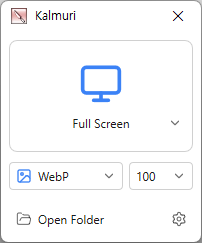
After selecting the desired range and the format to save, press the hotkey to capture.
(For the first time the hotkey is PrintScreen. It can be changed through the hotkey settings.) - For the menu, click the right mouse button on the Kalmuri screen.
Homepage
License
- Kalmuri is Freeware.
- Use it anywhere you like — at the office, at home, in government offices, or at school.
- You may redistribute it freely anywhere.
History
-
Version 5.0.4 (2026/11/02)
- Added an option to clean up rounded corners in window captures on Windows 11
- Added a magnifier option for selecting capture areas and extracting colors
- Added options to select the save folder and open the file location after capture
- Added Naver Whale support and prioritized the default browser for webpage capture
- Fixed duplicated mouse cursors in DXGI captures and recordings
-
Version 5.0.3 (2026/10/24)
- Fixed capture shortcuts not working while some games were in the foreground
- Added screen handling options for Windows captures and recordings
- Added System / Light / Dark theme options
-
Version 5.0.2 (2026/10/21)
- Added support for macOS
- Added drag-to-fit sizing for the area window
- Switched to full screen when no webpage capture tab is available
- Changed the capture area icon in the area window
-
Update Policy Notice
- Auto-update is not supported to enhance security and prevent antivirus false positives.
- Updates are manually distributed after internal verification and stability confirmation.
 Download
(Windows)
 Download
(macOS)