

OpenSide
Let AI handle your web tasks.
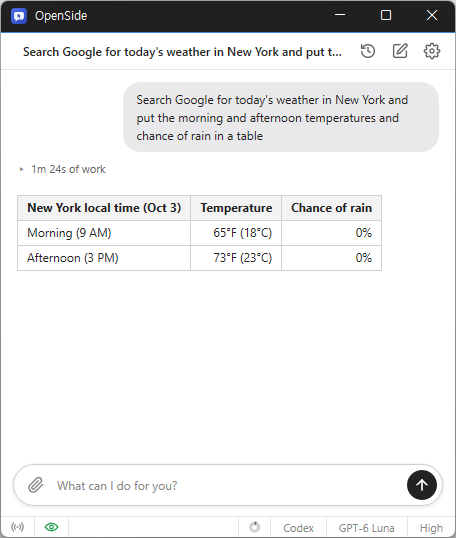
Feature
- Tell AI what you need, and it handles searches, clicks, and typing.
- Automate repetitive tasks like filling out forms and collecting data.
- Use your existing Chrome or Edge browser and stay signed in.
- Request tasks and receive results from anywhere via Telegram.
- Save collected data to Excel.
Usage
- Enter your task in the chat.
Homepage
License
- OpenSide is Freeware.
- Use it anywhere you like — at the office, at home, in government offices, or at school.
- You may redistribute it freely anywhere.
History
-
Version 1.1.6 (2026/11/10)
- Changed the text cursor to follow the active window and system blink settings
- Fixed black edges appearing while resizing windows
- Fixed text overflow in single-line inputs and lists and overlap with list arrows
- Refined spacing between images and text and separated URL lines in blog posts
- Fixed duplicate numbering in numbered lists
- Updated label saving to fit within the 200-byte limit
- Fixed requests being rejected with an error in reopened conversations
- Fixed redelivered files not showing a download button or reaching Telegram
-
Version 1.1.4 (2026/11/06)
- Refined post writing for various blogs
- Preserved the Run at boot setting during Windows updates
- Disabled the Run at boot setting in the portable Windows version
-
Version 1.1.3 (2026/11/03)
- Added support for connecting to Chrome under another profile and choosing from multiple connections
- Changed account, model, or response level changes during a conversation to keep the current conversation
- Added the option to pin conversations at the top of the recent conversations list
- Changed the composer to place the input and buttons on separate rows when the text spans multiple lines
-
Update Policy Notice
- Auto-update is not supported to enhance security and prevent antivirus false positives.
- Updates are manually distributed after internal verification and stability confirmation.
 Download now
(Windows)
 Download now
(macOS)