

FileIndex
Fast and Easy File Search Tool
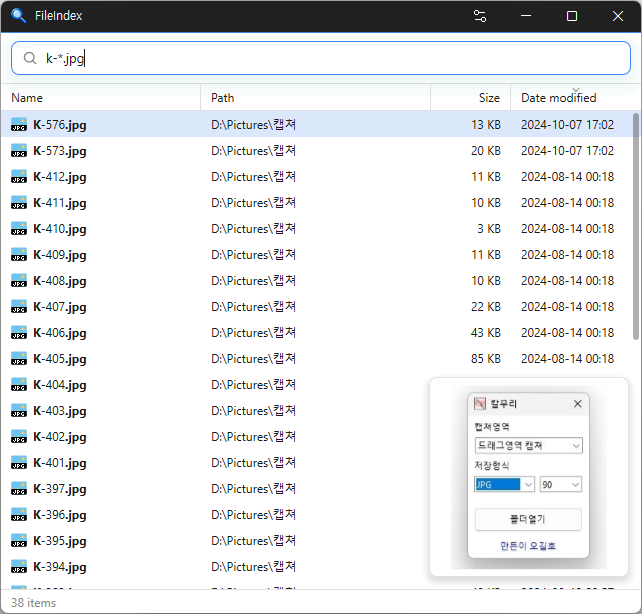
Feature
- Instantly find files across your entire PC by simply typing a file name.
- Supports Korean initial consonant search to find files with just a few keystrokes.
- Offers advanced search filters, including extensions, file sizes, wildcards, and regular expressions.
- Detects duplicate files by comparing names, sizes, and file contents.
- Keeps search results up to date by tracking file changes in real time.
- Minimizes system impact with fast initial indexing and low memory usage.
- Supports opening, copying, dragging and dropping, and previewing files just like File Explorer.
- Keeps your file index stored locally without sending data to external servers.
- Supports 22 languages and light and dark themes.
Usage
- Enter a file name to search.
Homepage
License
- FileIndex is Freeware.
- Use it anywhere you like — at the office, at home, in government offices, or at school.
- You may redistribute it freely anywhere.
History
-
Version 0.9.7 (2026/11/10)
- Reduced freezing when interacting with lists or opening files, folders, and web addresses.
- Fixed freezing during real-time updates when reopening windows.
- Updated document preview tables to wrap long text without spaces within cells.
- Changed document previews to update only after arrow-key file navigation stops.
- Fixed an issue where arrow-key input would stop working when selecting preview items in certain environments.
- Fixed black areas remaining after resizing a window during document preview.
-
Version 0.9.4 (2026/11/06)
- Added retries for up to one minute when the notification area icon fails to appear
- Added a loading indicator when search results take over 0.3 seconds to appear
-
Version 0.9.3 (2026/11/05)
- Added content search for text and document files with `:keyword`
- Added drag selection of multiple files from the path, size, or date columns or empty list space
- Changed startup indexing and change tracking to begin when the PC is idle
- Fixed the tray icon not appearing after startup in some environments
- Added the program version to the tray icon tooltip
-
Update Policy Notice
- Auto-update is not supported to enhance security and prevent antivirus false positives.
- Updates are manually distributed after internal verification and stability confirmation.
 Download now
(Windows)