
Update
- Changed the text cursor to follow the active window and system blink settings
- Fixed black edges appearing while resizing windows
- Fixed text overflow in single-line inputs and lists and overlap with list arrows
- Refined spacing between images and text and separated URL lines in blog posts
- Fixed duplicate numbering in numbered lists
- Updated label saving to fit within the 200-byte limit
- Fixed requests being rejected with an error in reopened conversations
- Fixed redelivered files not showing a download button or reaching Telegram
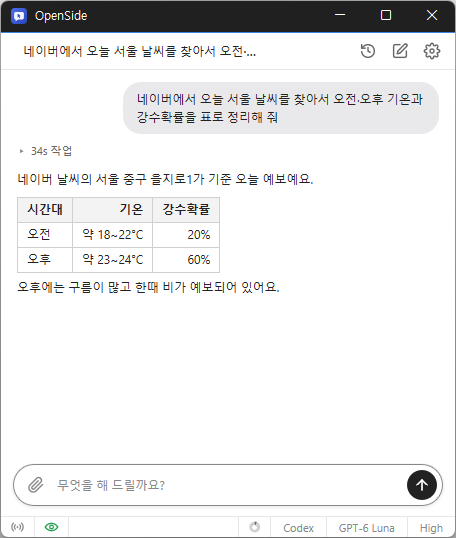
- Tell AI what you need, and it handles searches, clicks, and typing.
- Automate repetitive tasks like filling out forms and collecting data.
- Use your existing Chrome or Edge browser and stay signed in.
- Request tasks and receive results from anywhere via Telegram.
- Save collected data to Excel.
Website
- OpenSide: https://kilho.net/openside
History
-
Version 1.1.4 (2026/11/06)
- Refined post writing for various blogs
- Preserved the Run at boot setting during Windows updates
- Disabled the Run at boot setting in the portable Windows version
-
Version 1.1.3 (2026/11/03)
- Added support for connecting to Chrome under another profile and choosing from multiple connections
- Changed account, model, or response level changes during a conversation to keep the current conversation
- Added the option to pin conversations at the top of the recent conversations list
- Changed the composer to place the input and buttons on separate rows when the text spans multiple lines
-
Version 1.1.2 (2026/10/23)
- Fixed keyboard input not reaching the text field after returning from another app on Windows
- Added a quit confirmation for the tray and macOS menu bar quit commands and macOS Cmd+Q
- Added a Windows setting to minimize the app to the tray when closing its window
-
Version 1.1.1 (2026/10/20)
- Added support for file attachments
- Added macOS support
License
- OpenSide is freeware.
- You can use it freely anywhere, whether at work, at home, in a government office, or at school.
- You’re free to distribute it anywhere.
Download
 Download
(Windows)
 Download
(macOS)
Frequently Asked Questions (FAQ)
- Is it free?
Yes. OpenSide is freeware.
AI usage charges depend on the plan for the AI account or API key you use. - Are there ads?
No, there are no ads. - Can I use it without installing it?
Yes. Extract the portable ZIP version and run OpenSide.exe. - Can I use AI services other than ChatGPT?
Yes. Add your Claude, OpenAI, or Gemini API keys, then switch between them right from the chat screen. - Can I use my browser while the AI is working?
Yes. The AI only works in its own tab, so you can keep doing what you were doing in other tabs.
Related Links
- Update announcement: https://kilho.net/archives/notice/2940