
Tag: Screen Capture

Update

Kalmuri 5.1.0 Update

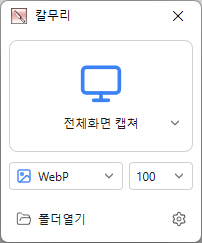
Added an editor for editing captured images without saving them to a file first Added tools for selection, shapes, lines, text, redaction, and cropping Capture the full screen, active programs, window controls, or selected areas Edit captured images instantly without saving them first Record videos in full screen or a selected area Extract text from images using OCR Pin captured images on your screen Save in PNG, JPG, BMP, GIF, WebP, or MP4 format Share captured images directly to the web Print captured images instantly Pick colors from anywhere on your screen Capture entire web pages
Lees verder — Kalmuri 5.1.0 Update
Update

Kalmuri 5.0.5 Update

Added video and audio quality options for MP4 recordings and changed the default video quality to Standard Capture the full screen, active programs, window controls, or selected areas Edit captured images instantly without saving them first Record videos in full screen or a selected area Extract text from images using OCR Pin captured images on your screen Save in PNG, JPG, BMP, GIF, WebP, or MP4 format Share captured images directly to the web Print captured images instantly Pick colors from anywhere on your screen Capture entire web pages

Lees verder — Kalmuri 5.0.5 Update
Update

Kalmuri 5.0.0 Update

Enhanced image upload security and failure handling Fixed WebP save errors and empty file creation Fixed recording startup and status issues in some environments Improved screen capture and drag capture stability Prevented existing files from being overwritten during rapid consecutive captures Prevented OCR and configuration errors Improved duplicate application launch prevention Improved capture area size and position saving Enhanced overall application stability Capture the full screen, active programs, window controls, or selected areas Edit captured images instantly without saving them first Record videos in full screen or a selected area Extract text from images using OCR Pin captured images on your screen Save in PNG, JPG, BMP, GIF, WebP, or MP4 format Share captured images directly to the web Print captured images instantly Pick colors from anywhere on your screen Capture entire web pages

Lees verder — Kalmuri 5.0.0 Update
Update

Kalmuri 4.3.1 Update

Enhanced image upload security and failure handling Fixed WebP save errors and empty file creation Fixed recording startup and status issues in some environments Improved screen capture and drag capture stability Prevented existing files from being overwritten during rapid consecutive captures Prevented OCR and configuration errors Improved duplicate application launch prevention Improved capture area size and position saving Enhanced overall application stability Capture the full screen, active programs, window controls, or selected areas Edit captured images instantly without saving them first Record videos in full screen or a selected area Extract text from images using OCR Pin captured images on your screen Save in PNG, JPG, BMP, GIF, WebP, or MP4 format Share captured images directly to the web Print captured images instantly Pick colors from anywhere on your screen Capture entire web pages

Lees verder — Kalmuri 4.3.1 Update
Update

Kalmuri 4.2.7 Update

Fixed webpage capture failures and subsequent capture issues in some environments Fixed save folder selection issues in certain situations Capture the full screen, active programs, window controls, or selected areas Edit captured images instantly without saving them first Record videos in full screen or a selected area Extract text from images using OCR Pin captured images on your screen Save in PNG, JPG, BMP, GIF, WebP, or MP4 format Share captured images directly to the web Print captured images instantly Pick colors from anywhere on your screen Capture entire web pages

Lees verder — Kalmuri 4.2.7 Update
Update

Kalmuri 4.1.9 Update

Improved UI behavior when selecting save format Enhanced memory stability after drag capture Improved stability when receiving external commands Capture the full screen, active programs, window controls, or selected areas Edit captured images instantly without saving them first Record videos in full screen or a selected area Extract text from images using OCR Pin captured images on your screen Save in PNG, JPG, BMP, GIF, WebP, or MP4 format Share captured images directly to the web Print captured images instantly Pick colors from anywhere on your screen Capture entire web pages

Lees verder — Kalmuri 4.1.9 Update
Update

Kalmuri 4.0.9 Update

Applied lossless encoding when WebP quality is set to 100% Fixed WebP setting value saving error Capture the full screen, active programs, window controls, or selected areas Edit captured images instantly without saving them first Record videos in full screen or a selected area Extract text from images using OCR Pin captured images on your screen Save in PNG, JPG, BMP, GIF, WebP, or MP4 format Share captured images directly to the web Print captured images instantly Pick colors from anywhere on your screen Capture entire web pages

Lees verder — Kalmuri 4.0.9 Update
Update

Kalmuri 3.6.2 Update

Fixed WebP processing module Capture the full screen, active programs, window controls, or selected areas Edit captured images instantly without saving them first Record videos in full screen or a selected area Extract text from images using OCR Pin captured images on your screen Save in PNG, JPG, BMP, GIF, WebP, or MP4 format Share captured images directly to the web Print captured images instantly Pick colors from anywhere on your screen Capture entire web pages

Lees verder — Kalmuri 3.6.2 Update
Update

Kalmuri 3.8.6 Update

Added ability to modify current size in area screen settings. Fixed to prevent crashing when saving settings fails. Fixed web browser related modules. Capture the full screen, active programs, window controls, or selected areas Edit captured images instantly without saving them first Record videos in full screen or a selected area Extract text from images using OCR Pin captured images on your screen Save in PNG, JPG, BMP, GIF, WebP, or MP4 format Share captured images directly to the web Print captured images instantly Pick colors from anywhere on your screen Capture entire web pages

Lees verder — Kalmuri 3.8.6 Update
Update

Kalmuri 3.7.10 Update

Fixed an error found in the webpage capture module. Added an error message on bootup. Capture the full screen, active programs, window controls, or selected areas Edit captured images instantly without saving them first Record videos in full screen or a selected area Extract text from images using OCR Pin captured images on your screen Save in PNG, JPG, BMP, GIF, WebP, or MP4 format Share captured images directly to the web Print captured images instantly Pick colors from anywhere on your screen Capture entire web pages

Lees verder — Kalmuri 3.7.10 Update