
There is a new post. Click here to view the latest post.
Perbarui
- Added ability to modify current size in area screen settings.
- Fixed to prevent crashing when saving settings fails.
- Fixed web browser related modules.
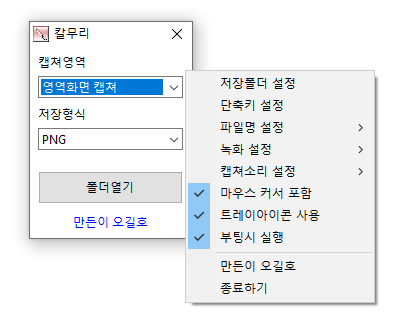
- Capture the full screen, active programs, window controls, or selected areas
- Edit captured images instantly without saving them first
- Record videos in full screen or a selected area
- Extract text from images using OCR
- Pin captured images on your screen
- Save in PNG, JPG, BMP, GIF, WebP, or MP4 format
- Share captured images directly to the web
- Print captured images instantly
- Pick colors from anywhere on your screen
- Capture entire web pages
Download
 Download
(Windows)
 Download
(macOS)
Website
- Kalmuri: https://kalmuri.kilho.net
History
-
Version 3.8.3 (2024/08/25)
- Fixed guideline bug when taking active screen capture
-
Version 3.8.2 (2024/08/15)
- Added Drag Region Capture
-
Version 3.8.0 (2024/07/22)
- Fixed bugs and improve reliability
-
Version 3.7.10 (2024/06/18)
- Fixed an error found in the webpage capture module.
- Added an error message on bootup.
License
- Kalmuri is freeware.
- You can use it freely in any setting, including at your company, home, government office, or school.
- You may freely distribute it anywhere.
Related Links
- Update Notice: https://kilho.net/archives/notice/2940
항상 감사한 마음인데 댓글로는 처음 남겨봅니다
아주 예전부터, 정말 잘 사용하고 있습니다
오늘 내일 즐거운 주말 보내시고
항상 주변에 행복이 가득하시길 바랍니다
감사합니다~잘 사용하고 있습니다