
There is a new post. Click here to view the latest post.
Perbarui
- Added video and audio quality options for MP4 recordings and changed the default video quality to Standard
- Capture the full screen, active programs, window controls, or selected areas
- Edit captured images instantly without saving them first
- Record videos in full screen or a selected area
- Extract text from images using OCR
- Pin captured images on your screen
- Save in PNG, JPG, BMP, GIF, WebP, or MP4 format
- Share captured images directly to the web
- Print captured images instantly
- Pick colors from anywhere on your screen
- Capture entire web pages
Website
- Kalmuri: https://kalmuri.kilho.net
History
-
Version 5.0.4 (2026/11/02)
- Added an option to clean up rounded corners in window captures on Windows 11
- Added a magnifier option for selecting capture areas and extracting colors
- Added options to select the save folder and open the file location after capture
- Added Naver Whale support and prioritized the default browser for webpage capture
- Fixed duplicated mouse cursors in DXGI captures and recordings
-
Version 5.0.3 (2026/10/24)
- Fixed capture shortcuts not working while some games were in the foreground
- Added screen handling options for Windows captures and recordings
- Added System / Light / Dark theme options
-
Version 5.0.2 (2026/10/21)
- Added support for macOS
- Added drag-to-fit sizing for the area window
- Switched to full screen when no webpage capture tab is available
- Changed the capture area icon in the area window
-
Version 5.0.1 (2026/10/15)
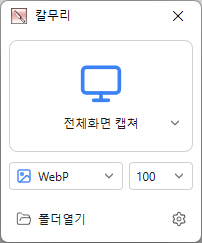
- Changed the main screen to show capture areas and save formats with icons
- Added ripple/highlight effects to show mouse click locations in recordings
- Added capture area/save format selectors and capture/recording buttons to the region window
- Added animated GIF/WebP recording and frame rate settings
- Added graphics card based screen capture and recording
- Added NVIDIA/Intel/AMD graphics card support for MP4 recording
- Refined alignment of video and audio at the start of recording
- Added region window color selection in settings
- Added a stop recording button to the main screen
License
- Kalmuri is freeware.
- You can use it freely anywhere, including at work, at home, in government offices, and at school.
- You’re free to distribute it anywhere.
Download
 Download
(Windows)
 Download
(macOS)
Frequently Asked Questions (FAQ)
- Is Kalmuri free?
Yes, Kalmuri is free to use anywhere, including at work, at home, at school, and in government offices. - What image formats are supported for screenshots?
It supports PNG, JPG, WebP, BMP, and GIF. - Can I record video, too?
Yes, you can record your entire screen or a selected area as a video. - Can I extract text from a screenshot?
Yes, you can extract text from images using optical character recognition (OCR). - Do I need to install the program?
No, Kalmuri runs as a single file without requiring installation.
Related Links
- Update announcement: https://kilho.net/archives/notice/2940
영역화면 설정 시에 돋보기 기능 건의드렸었는데 해주셨네요 ㅎㅎ
너무 좋습니다. 감사합니다~ ^^