
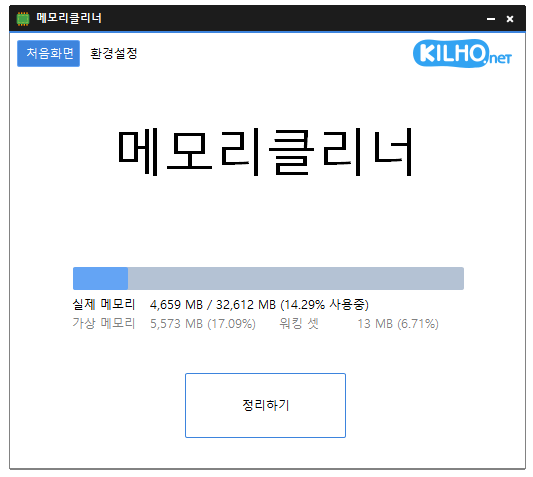
Perbarui
- Fixed unexpected program exits during logoff or restart in some environments when using the Korean IME
- Refined translations of settings names, memory labels, and messages in some languages
- Changed how running programs are closed during installation or uninstallation
- Changed the app display name to MemoryCleaner in all languages except Korean
- A lightweight program for efficient memory management.
- Choose which memory areas you want to clean.
- Automatically cleans memory based on your selected interval or memory usage.
- Automatically clears cached memory when available memory runs low.
- Runs quietly in the system tray with minimal memory usage.
Website
- MemoryCleaner : https://memorycleaner.kilho.net
History
-
Version 3.0.1 (2026/10/20)
- Fixed display issues caused by DPI settings on affected systems
-
Version 3.0.0 (2026/09/29)
- Rewrote MemoryCleaner from Delphi in pure C for faster and more stable performance
- Reduced background memory usage by more than 95 percent for lighter long term operation
- Reduced the application size by approximately 98 percent for faster startup and a smaller footprint
- Added the option to choose exactly which memory areas to clean
- Added a new automatic cleanup feature that clears cached memory when available memory runs low
- Added cached memory size and usage information directly to the main screen
- Improved default cleanup settings to help reduce interruptions while gaming or watching videos
- Fixed an issue where cleanup could appear to fail on some PCs when a specific item was unavailable
- Enhanced error detection to help identify and resolve unexpected shutdowns faster
- Added a button to restore all settings to their defaults
- Fixed an issue where update checks might not complete correctly on some PCs
- Removed unnecessary permission requests and improved overall reliability
-
Version 2.0.3 (2026/09/03)
- Improved fullscreen detection for uninterrupted gaming and video playback
- Enhanced stability by preventing errors that could occur during shutdown on some systems
- Fixed incorrect completion notifications when memory cleanup fails
- Optimized automatic cleanup to prevent excessive repeated cleaning on certain systems
- Prevented configuration errors caused by corrupted or outdated settings
-
Version 2.0.2 (2026/08/13)
- Added an option to skip memory cleanup while using full-screen apps
- Improved an issue where auto-start settings could remain after uninstalling in some environments
- Fixed an issue where options could change unexpectedly while loading settings in some environments
- Improved auto-start reliability
License
- MemoryCleaner is freeware.
- Use it freely anywhere—at work, at home, in government offices, at school, and more.
- You’re free to distribute it anywhere.
Download
 Download
(Windows)
Frequently Asked Questions (FAQ)
- Is MemoryCleaner free?
Yes, you can use MemoryCleaner for free anywhere, including at work, at home, at school, or in government offices. - How do I clean up memory?
After launching the program, click the ‘Clean’ button to clean up your memory right away. - Can memory be cleaned up automatically?
Yes, you can set it to clean up automatically based on memory usage or at regular intervals. - Do I need to install it?
No, you can run and use it right away without installing anything.
Related Links
- Update announcement : https://kilho.net/archives/notice/2940