
There is a new post. Click here to view the latest post.
Perbarui
- Added faster file and folder access from the start screen, right click menu, and Ctrl+O
- Improved file opening to easily find and play 38 media formats
- Improved file associations and icons so major media files are ready immediately after installation
- Prevented launch issues affecting some users when required components were missing
- Added customizable mouse actions and keyboard shortcuts
- Plays many media formats right away, with no extra codecs to install.
- Hardware acceleration keeps high-resolution video smooth.
- Ready to use as soon as it is installed, and it stays light and fast.
Homepage
- KPlayer : https://kplayer.kilho.net
History
-
Version 0.9.9 (2026/09/11)
- Added customizable mouse controls for clicks, double clicks, the middle button, and the mouse wheel
- Added custom keyboard shortcuts for 29 essential player actions
- Improved automatic subtitle language selection based on each user’s environment
- Added an Always on Top button directly to the player window
- Improved an issue where subtitles could disappear after changing settings for some users
- Improved mouse wheel scrolling in the settings window for some environments
- Improved an issue where the screenshot folder window could appear behind other windows for some users
- Simplified the settings screen and made screenshot options easier to understand
- Added detailed subtitle styling for fonts, colors, bold text, outlines, shadows, position, and alignment
- Improved an issue where subtitle position could move when using the mouse
- Added quick screen size options for original size, full screen, and stretched full screen
- Added startup window options to keep the last size, fit the video, or launch in full screen
- Improved window position and size saving between sessions
-
Version 0.9.8 (2026/09/05)
- Fixed an issue that prevented settings from being saved correctly for some users.
- Streamlined internal operations for a smoother and more reliable experience.
- Improved network responsiveness for faster and more stable performance.
-
Version 0.9.7 (2026/08/28)
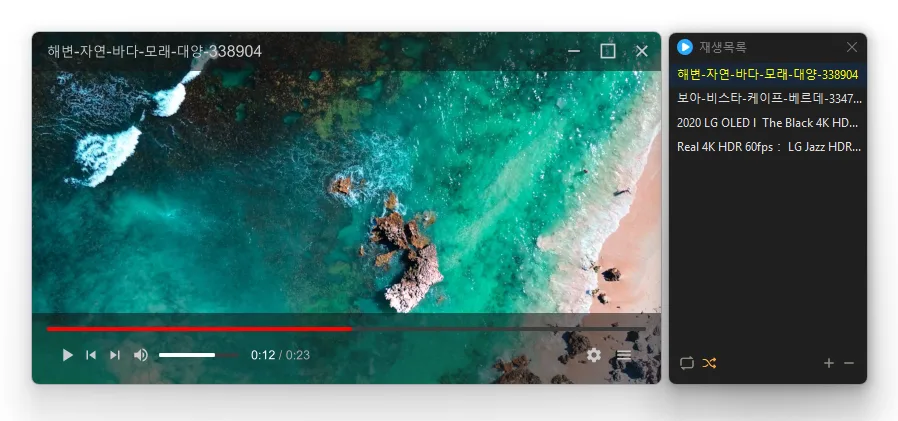
- Added file drop on the main window to replace the playlist and play instantly, or on the playlist window to add files
- Changed volume up while muted to automatically restore sound
- Improved startup speed significantly in some network drive environments
- Added much faster and smoother bulk media importing
- Added a new TAB key panel for instant access to file details and live playback information
-
Version 0.9.6 (2026/08/13)
- Fixed an issue where dragged and dropped files would not start playing immediately
- Expanded multi-language support for a more convenient experience
License
- KPlayer is open-source software.
- You can use it freely without restrictions on location, including at your company, home, government office, or school.
- You are free to distribute it anywhere.
Download
 Download
(Windows)
(GitHub)
Frequently Asked Questions (FAQ)
- Is KPlayer free?
Yes, KPlayer is free to use anywhere, including at home, at your company, in government offices, and at school. - Which video formats does it support?
It supports major media formats such as MP4, MKV, AVI, MOV, WMV, ASF, and MP3. - Does it include ads or adware?
No, KPlayer is completely free of ads and adware. No unwanted programs are installed along with it. - Is it open source?
Yes, KPlayer is distributed as open-source software. You can inspect the source code, and the software is developed transparently. - Can I add multiple files at once?
Yes, you can add multiple files or folders to the playlist at once using drag and drop.
Related Links
- Program source code : https://github.com/newkilho/KPlayer
- Update information : https://kilho.net/archives/notice/2940